Chamber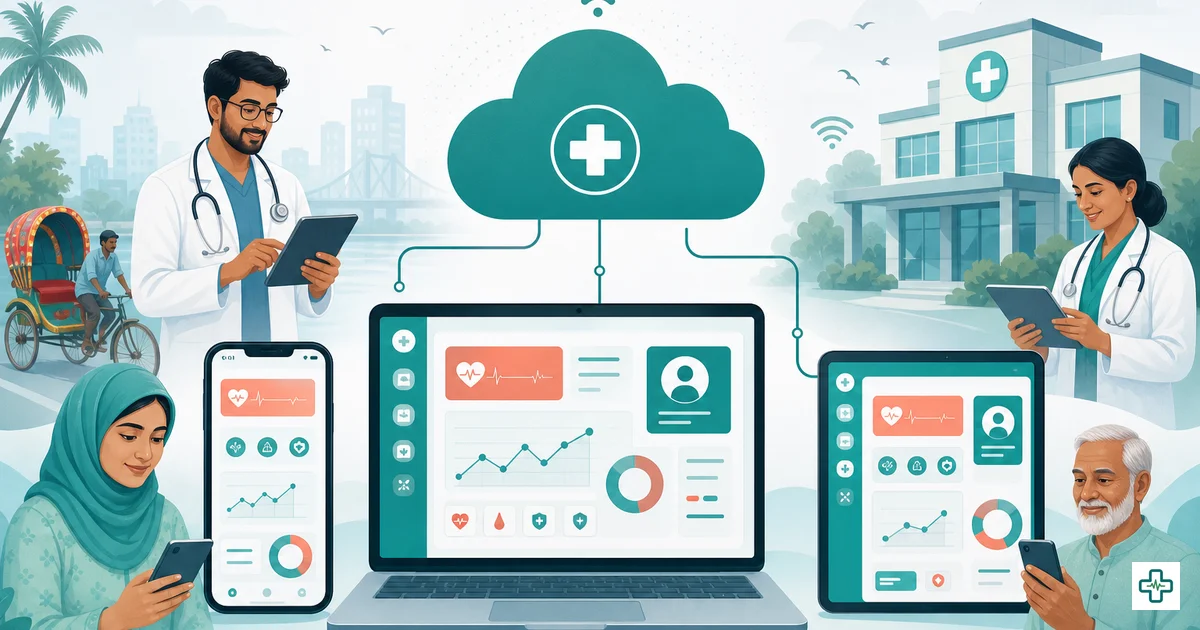
Web-based clinic management system in Bangladesh: why cloud beats desktop in 2026
If you are setting up or upgrading a clinic in Bangladesh today, you will hear two very different sales pitches. One vendor offers you a program installed on the front-desk computer — a classic desktop system. Another offers software that you simply open in a web browser and log into from anywhere — a web-based clinic management system. They can look similar on a demo screen, but underneath they are built on opposite assumptions, and that difference quietly decides how safe your patient records are, how much you spend, and whether you can ever check your clinic from your phone.
This guide explains, honestly, what an online clinic management software actually is, where cloud clinic software in Bangladesh genuinely beats old desktop tools, and where the real concerns — internet dependence and data security — sit and how good software answers them. The goal is not to sell you cloud blindly. It is to help a clinic owner make the call with clear eyes in 2026.
What is a web-based clinic management system?
A web-based (or "online" or "cloud") clinic management system is software that runs on the internet and that you use through an ordinary web browser — Chrome, Edge, Safari — on whatever device you have. Nothing is installed on a particular computer. You go to a web address such as app.chamberbd.com, log in with your username and password, and your clinic's appointments, patients, prescriptions, billing and reports are right there, live.
The data does not live on the reception PC. It lives on secure servers managed by the software provider, and your browser is simply a window into it. That single architectural choice is the root of almost every advantage and every concern in this article. Because the data and the program sit on the provider's servers rather than your desk, you stop being responsible for installation, updates, backups and hardware — and you gain the ability to reach the same data from any device with a login.
How it differs from desktop software
Old desktop clinic software is the opposite. The program is installed onto one specific Windows computer, and the database file usually sits on that same machine (or a small office server). To use it, you must be sitting at that computer. To update it, someone has to come and re-install. To protect the data, someone has to remember to copy the database to a pendrive or external disk. It works — Bangladeshi clinics ran on this model for years — but every responsibility stays on your shoulders, and everything is tied to one box on one desk.
Web-based vs desktop clinic software: the honest comparison
Here is the difference laid out plainly. The pattern matters more than any single row — notice how many responsibilities move off the clinic with a web-based system.
| Factor | Web-based / cloud system | Old desktop software |
|---|---|---|
| Where you can use it | Any device with a browser and login (phone, laptop, reception PC) | Only the one computer it is installed on |
| Installation | None — just open the web address | Manual install (and re-install on a new PC) |
| Updates & new features | Automatic, instant, for everyone at once | A technician must visit, often paid extra |
| Data backup | Automatic, handled by the provider | Your responsibility — usually skipped |
| If the clinic PC breaks | Inconvenient — log in from another device, data is safe | Possible total data loss with no backup |
| Multiple branches | One login sees all branches; consolidated reports | Separate copies, manual syncing, no single view |
| Mobile / remote access | Built in — check the clinic from home | Usually none |
| Upfront cost | Low — small monthly fee, start today | Large one-time licence and a capable PC |
| Internet needed | Yes, an ordinary connection | No (runs offline on that PC) |
| Security depends on | The provider's servers, encryption and access controls | The physical safety of one office computer |
Why cloud beats desktop for most clinics in 2026
Access from anywhere — including your phone
This is the change owners feel first. With a web-based system you can open your clinic from a phone on the way home, from your chamber upstairs, or from another city. You can see how many patients came today, what the day's collection was, whether the accountant entered an expense — without standing at the reception desk. For an owner who runs the clinic alongside their own practice, or who travels, this alone changes the job. Desktop software simply cannot offer it: the data is locked to one machine.
Automatic backups — your records survive a dead computer
Ask any clinic that lost data the hard way and they will tell you the same story: the front-desk computer's disk failed, or it was stolen, or a virus corrupted the database — and there was no backup, because backing up was "someone's responsibility" and it got skipped for months. A web-based system removes that risk by design. Your data lives on the provider's servers and is backed up automatically. A broken clinic computer becomes a minor annoyance — buy or borrow another device, log in, and everything is exactly where you left it. Nothing is lost.
No installation, no IT person
With desktop software, every new computer means a new installation, configuration and licence transfer — and when something breaks, you call (and often pay) a technician. A web-based system needs none of that. There is nothing to install and nothing to maintain on your side. Onboarding a new reception PC is as simple as opening the browser and logging in. For a small clinic with no dedicated IT staff — which is most clinics in Bangladesh — this removes a constant, irritating cost.
Instant, automatic updates
Software must keep changing: new medicines in the catalogue, fixed bugs, new features, compatibility with the latest phones and browsers. On desktop software, updates mean a visit and often a fee — and many clinics simply freeze on an old version that slowly rots. On a web-based system, updates happen on the provider's servers and reach every clinic instantly. You log in tomorrow and the improvement is already there, at no extra cost and with no disruption.
Multi-branch from a single login
If you run — or plan to run — more than one branch, this is decisive. A web-based system lets you manage every branch from one login, with each branch's accounts kept separately and a consolidated view across all of them. You see the whole business in one place. With desktop software, each branch is an island: a separate installation, a separate database, and no way to compare them without manually carrying numbers between computers. Our guide to a diagnostic center software setup shows how this multi-location logic plays out in practice.
Lower upfront cost
Desktop software usually demands a large one-time licence fee plus a capable computer before you can begin. A web-based system flips this: a small predictable monthly fee, and you can start today. For a new clinic watching its cash flow, not having to write a big cheque on day one is a real advantage — and the monthly cost is easy to budget. If you are weighing the long-term maths, our cloud vs one-time clinic software cost comparison walks through the honest three-year totals.
The genuine concerns — and how good cloud software handles them
It would be dishonest to pretend a web-based system has no trade-offs. It has two real ones, and a clinic owner is right to ask about both before committing.
"What if my internet goes down?"
This is the most common and most fair concern in Bangladesh, where load-shedding and patchy connections are a daily reality. A web-based system needs an internet connection to work — that is the honest truth. But the practical picture in 2026 is far better than it was even a few years ago:
- Mobile internet is everywhere. A web-based clinic system runs comfortably on ordinary 4G. If your broadband drops, a phone hotspot keeps the reception desk working — most pages are light and do not need heavy bandwidth.
- Load-shedding hits desktops too. When the power goes, the front-desk computer running desktop software switches off just the same. A web-based system on a charged phone or laptop with mobile data actually keeps running through a power cut — often more resilient than the old box on the desk.
- A small backup connection is cheap insurance. A modest mobile data pack or a second SIM costs little and removes the worry entirely. Compared to the risk of losing all your data on a desktop with no backup, internet dependence is the smaller, more manageable problem.
"Is my patient data safe on someone else's servers?"
The instinct that data "on my own computer" is safer than data "on the internet" is understandable — but on close inspection it is usually backwards. A single office PC is, in security terms, fragile: it can be stolen, its disk can fail, anyone who walks up to it can open the records, and it rarely has any backup. Good cloud software protects data far more seriously than a lone desktop ever does:
- Encryption. Reputable web-based systems encrypt data in transit (the connection between your browser and the server) so it cannot be read if intercepted.
- Role-based access control. Instead of everyone sharing one login on one PC, each staff member gets their own account with only the permissions their job needs — the accountant sees finances, reception sees appointments, a doctor sees clinical records. Our deep-dive on role-based access and data security for clinics explains exactly why this matters.
- Automatic backups and server-grade protection. Provider servers are backed up and maintained with security standards that no single clinic PC comes close to. The data is safer there than on a machine in your reception.
For the regulatory and ethical side of handling records well, our note on choosing clinic management software covers what to verify before you trust any vendor — cloud or desktop — with years of patient data.
How ChamberBD Clinic is built for this
ChamberBD Clinic is a fully web-based, mobile-responsive clinic management system designed for Bangladeshi clinics and chambers — you log in at app.chamberbd.com, nothing to install. Everything described above is how it works by default:
- Multi-branch / multi-center from one login — each center keeps its own accounting, with a consolidated view across all of them.
- Role-based access — owner, admin, manager, accountant, reception, doctor and pharmacist roles, each seeing only what their job needs.
- Multi-doctor scheduling and fees, with doctor revenue-share / payout tracking — see our cost comparison for the wider economics.
- Staff, attendance and payroll, and shared patients across doctors and branches.
- Appointments with a token queue and reception board to run a busy waiting room calmly.
- Digital prescriptions drawing on a 23,000+ medicine catalogue, with clean Rx print.
- Payments and a daily summary, billing and invoices, expenses, and reports / analytics — the money side handled end to end.
- Fully bilingual Bangla and English, so every staff member works in the language they are comfortable in.
Because it is web-based, every one of these is available on a phone, every update is automatic, and every record is backed up on the provider's servers — not stranded on a reception PC. You can explore the platform on the ChamberBD Clinic site or the clinic management software page.
Simple, predictable pricing
ChamberBD Clinic is priced for clinics of different sizes: Starter ৳3,000/month, Pro ৳6,000/month and Enterprise ৳12,000/month. You can take a free trial or book a demo at clinic.chamberbd.com before deciding — and if you want to talk it through first, you can get in touch here.
How to choose — a short checklist
Whichever way you lean, run these checks before you pay. They separate software that helps a clinic from software that quietly traps it.
- Does it truly work on a phone? Test it on a real phone, not just a sales laptop. Staff and owners increasingly expect mobile access.
- Where is the data stored and how often is it backed up? For cloud, get a clear answer on backups and encryption. For desktop, be honest that backup will be your job — and that it usually gets skipped.
- Can each staff member have their own role and login? Shared single logins are a security and accountability problem; per-role access is far safer.
- Can you export your own data? Your records must be downloadable in a standard format. If a vendor cannot show you how to get your data out, treat it as a warning sign.
- What is the true cost over three years? For desktop, add updates, support visits, a replacement PC and the cost of a data loss. For cloud, the monthly fee usually bundles all of that in.
Frequently Asked Questions
What is a web-based clinic management system?
It is clinic software that runs on the internet and that you use through a web browser, rather than a program installed on one office computer. You log in from any device — phone, laptop or the reception PC — and your appointments, patients, prescriptions and billing are all there live, with the data stored and backed up on the provider's servers instead of your desk.
Is online clinic software safe in Bangladesh?
Good online clinic software is generally safer than a lone desktop. It encrypts the connection, gives each staff member their own role-based login, and backs up data automatically on secure servers. A single office PC, by contrast, can be stolen, fail, or be opened by anyone walking past — usually with no backup at all. The key is choosing a reputable provider and using per-role logins rather than one shared password.
What happens if the internet goes down?
A web-based system needs a connection, which is the honest trade-off. In practice, ordinary 4G mobile internet runs it fine, and a phone hotspot keeps the reception working if broadband drops. During load-shedding a charged laptop or phone on mobile data can actually keep running when the desktop PC has switched off — so for many clinics the cloud is more resilient, not less.
Can I manage more than one branch with cloud clinic software?
Yes — that is one of its biggest advantages. With a web-based system like ChamberBD you manage every branch from a single login, with each branch's accounting kept separate and a consolidated view across all of them. Desktop software cannot do this without separate installations and manual syncing between computers.
Do I need to install anything to use a web-based clinic system?
No. That is the point of web-based software — there is nothing to install and nothing to maintain on your side. You simply open the web address (for ChamberBD, app.chamberbd.com) in a browser and log in. Setting up a new reception computer takes seconds rather than a technician visit.
How much does a web-based clinic management system cost in Bangladesh?
It is usually a small predictable monthly fee with updates, backups and support included, rather than a large one-time licence. ChamberBD Clinic, for example, is ৳3,000/month (Starter), ৳6,000/month (Pro) or ৳12,000/month (Enterprise), with a free trial or demo available at clinic.chamberbd.com so you can try before committing.
Run your whole clinic from the cloud — on your phone, with backups and updates handled for you. ChamberBD Clinic is fully web-based, mobile-friendly and bilingual. Take a free trial or book a demo at clinic.chamberbd.com →
See the full feature picture on the clinic management software page, or talk to us first.