Chamber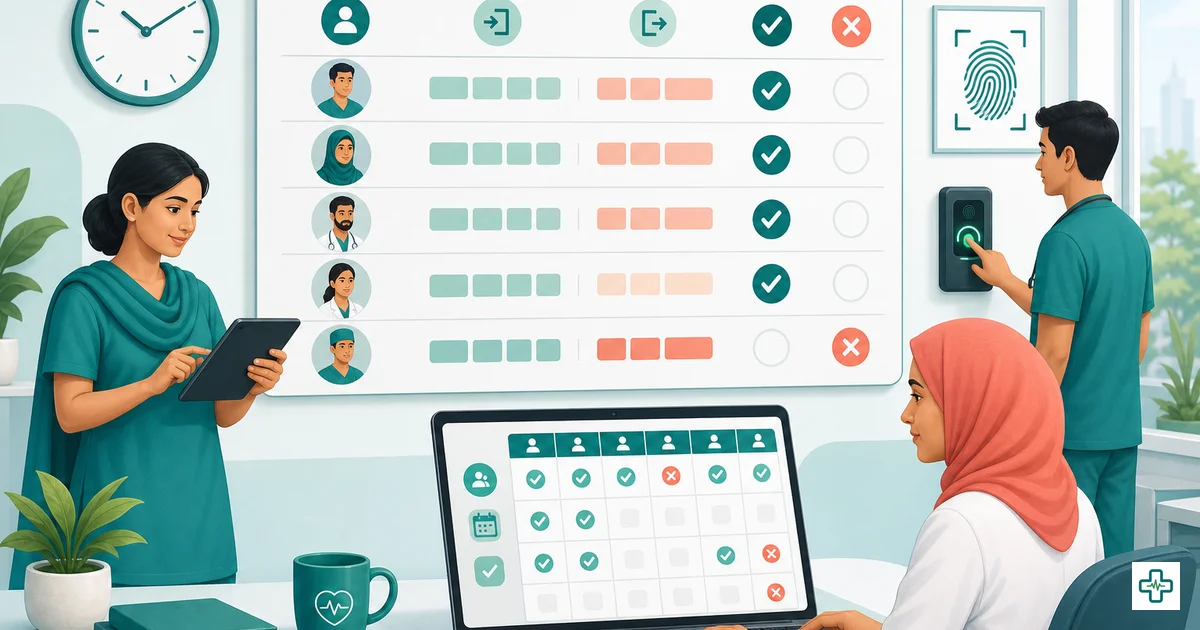
Clinic staff attendance management in Bangladesh (2026)
Ask any clinic owner in Bangladesh where their money quietly leaks, and attendance is rarely the first answer — but it should be. A receptionist who signs in at 9:00 in the register but actually walks in at 9:40. A ward boy who got a friend to mark him present on a day he never came. A nurse and a manager arguing at month-end about whether she took two days of leave or four. None of these is dramatic on its own. Added up across a year, across eight or twelve staff, they are real salary paid for hours nobody worked — and a steady stream of payroll disputes that poison the trust between you and your team.
This is a guide to clinic staff attendance management in Bangladesh in 2026: why the paper register fails, what "running attendance properly" actually means, and how a simple daily check-in/check-out system that produces a fair monthly summary can settle disputes before they start and feed your payroll the right numbers. It is written for clinic owners, polyclinic managers and HR staff who are tired of arguing over a notebook.
Why manual attendance registers fail
The hardback attendance register — a column for the date, a row per person, a signature each morning — is still the default in most clinics. It is cheap and familiar, and for a two-person chamber it is fine. The problem is that it was never designed to be honest or to do arithmetic, and a growing clinic needs both.
Buddy-punching and fake signatures
The single biggest flaw is that a register only proves someone signed — not that they were there. A staff member who is late or absent simply asks a colleague to sign for them, or backfills their own signature later in the day. This is "buddy-punching," and on paper it is invisible. You are paying full salary for attendance that never happened, and you have no way to catch it.
Lost hours and no real check-out
Most registers capture a morning signature and nothing else. There is no honest record of when someone arrived or when they left. The staff member who drifts in 30–40 minutes late every day, or slips out an hour early, looks identical on paper to the one who is punctual. Over a month those lost minutes become hours; over a year they become days of paid time you never received.
Payroll disputes you cannot win
Because the register and the salary live in two different places — a notebook and a manager's memory — month-end becomes a negotiation. "You cut three days, but I only took one." "I worked that Friday." With no reliable, time-stamped record tied to the pay calculation, you cannot prove your version, so you concede. The staff member learns that pushing back works, and next month the argument is bigger.
No summary, so payroll is guesswork
Even an honestly kept register is just raw marks. Someone still has to sit down at month-end and count present days, absent days, late marks and leave for every person, then translate that into a salary deduction. It is slow, it is error-prone, and it is exactly where mistakes and resentment are born.
What "running attendance properly" actually means
Doing attendance properly is not about buying an expensive biometric machine. It is about capturing a few honest facts every day and turning them into one fair number at month-end. There are really only five moving parts.
1. A daily check-in and check-out
Each staff member records when they arrive and when they leave — a real time-stamp, not a signature that can be faked or backdated. This one change kills buddy-punching and finally tells you the truth about lateness and early departures.
2. A clear status for every person, every day
Every working day, each active staff member should resolve to one status: present, absent, late, on leave, or half-day. No blanks, no guessing later. The status is what payroll ultimately reads.
3. Worked hours computed automatically
From the check-in and check-out times, the system should calculate worked minutes for you. You should never be adding up hours by hand — that is the job of the software, and it removes the arithmetic errors that fuel disputes.
4. A daily board you can see at a glance
A manager should be able to open one screen and see today's whole team — who is in, who is late, who is on leave, who has not checked in yet. That visibility is what lets you fix a staffing gap at 9:15 instead of discovering it from an angry patient at 11:00.
5. A monthly summary that feeds payroll
At month-end, all those daily statuses roll up into a per-staff summary: total present days, absent days, late marks, leave taken, half-days and total worked hours. That summary is not a separate report you re-key into payroll — it is the input to payroll, so the salary deduction for an unpaid absence is automatic and provable.
Attendance status types: what each one means
The whole system rests on marking the right status each day. Here is what each status means in a clinic and why it matters for pay.
| Status | What it means | Effect on payroll |
|---|---|---|
| Present | Checked in and worked the expected shift. | Full day paid; the normal case. |
| Absent | Did not come and it was not approved leave. | Usually an unpaid day — deducted from salary. |
| Late | Checked in after the agreed start time. | Often paid in full, but tracked; repeated lateness is a performance and fairness issue. |
| Leave | Approved time off — casual, sick or annual. | Paid or unpaid by your policy; either way it is recorded, not disputed. |
| Half-day | Worked roughly half the shift — came late or left early by arrangement. | Half the day's pay, applied consistently for everyone. |
The power of fixed statuses is consistency. When "half-day" always means the same thing and is applied to everyone the same way, staff stop feeling singled out, and you stop making case-by-case judgement calls you cannot defend.
From daily marks to a fair monthly summary
The link between the daily board and payroll is the monthly summary, and it is worth understanding because it is where fairness lives. Across the month, every check-in, check-out and status quietly accumulates. At month-end, for each staff member you get a single clear picture — say, 24 present, 1 absent, 3 late marks, 2 leave days and total worked hours — and that picture drives the salary calculation directly.
Two things make this fair. First, it is the same record for both sides: the staff member sees exactly the same numbers you do, so an unpaid absence is a fact on the screen, not your word against theirs. Second, the deduction is computed from that record, not improvised. A receptionist on ৳15,000 who has one unpaid absent day is docked roughly ৳15,000 ÷ 30 = ৳500 — and the summary shows precisely why. There is nothing left to argue about, which is the whole point.
Manual register vs attendance software
If you are weighing whether to move off the notebook, this is the honest comparison.
| What you need | Paper register | Attendance software |
|---|---|---|
| Proof someone was actually present | Just a signature — easy to fake or backfill | Time-stamped check-in/check-out |
| Honest arrival and leaving times | Rarely recorded | Captured every day, both ends |
| Worked hours | Counted by hand, if at all | Auto-computed from the times |
| Today's team at a glance | Flip pages; never live | One daily board, live |
| Monthly summary per staff | Hours of manual counting | Rolls up automatically |
| Feeds payroll directly | Re-keyed, error-prone | Same record drives the salary run |
| Settles a pay dispute | Your word vs theirs | A shared, provable record |
How ChamberBD Clinic handles attendance and payroll
This is exactly what the attendance module in ChamberBD Clinic is built to do, and it lives in the same system as your staff records and payroll so nothing has to be re-typed.
You start by adding each staff member as an HR record — designation, department, join date and salary type — so the system knows who is on the team and how they are paid. Day to day, staff check in and check out, and each person resolves to a status: present, absent, late, leave or half-day. The system auto-computes worked minutes from those times, so you are never adding hours by hand. A daily board shows every active staff member's status for the day, so a manager can see at a glance who is in, who is late and who is on leave.
At month-end, ChamberBD Clinic produces a monthly summary per staff — present, absent, late, leave, half-days and worked hours — and that summary feeds payroll directly. When you run salaries (on the Pro and Enterprise plans), absences and the rest are already reflected, so deductions are automatic and provable, advances and payslips are handled in the same place, and there is no second spreadsheet to reconcile. If you run more than one centre, you can assign staff to branches and keep each location's attendance separate while seeing the whole picture, and role-based access (RBAC) means a branch manager sees only their own team. The platform is bilingual and runs in the cloud and on mobile, so staff can check in from a phone and you can review attendance from anywhere.
Pricing, briefly
ChamberBD Clinic comes in three plans. Starter is ৳3,000/month and covers up to 10 staff with HR records and attendance — good for a single small clinic. Pro is ৳6,000/month, adds payroll (salary runs, advances, payslips and absence deductions) and supports unlimited staff. Enterprise is ৳12,000/month for larger or multi-branch operations. If your goal is to have attendance flow into salary automatically, you will want Pro or Enterprise, since payroll is not on Starter. You can start a free trial or book a demo at clinic.chamberbd.com.
Putting it in place without disruption
You do not need to switch everything overnight. Add your staff and their salary type, turn on daily check-in/check-out, and run the new system alongside the paper register for one month. At that first month-end, compare the software's monthly summary with what the notebook would have given you — the gap is usually the hidden lateness and the absences that used to slip through. Once your team sees that the record is honest and the same for everyone, the register quietly retires itself. For the wider context of running the whole front office this way, our clinic management software guide covers how attendance fits alongside appointments, billing and patient records.
Where attendance fits in your HR system
Attendance is one leg of a stool. The other two are who you hire and how you pay them. If you are still building your team, our guide to hiring a clinic assistant covers what to look for and what to pay, and once attendance is feeding clean numbers, our clinic staff payroll guide walks through turning those numbers into correct, on-time salaries with proper payslips. Together they make staff management something you run, rather than something that runs you.
Frequently Asked Questions
Why does a manual attendance register fail in a clinic?
A paper register only proves that someone signed, not that they were actually present, so it is wide open to buddy-punching — a colleague signing on your behalf or a signature backfilled later. It also rarely captures real arrival and leaving times, so daily lateness and early departures go unrecorded, and at month-end someone has to count everything by hand. The result is salary paid for hours nobody worked and pay disputes you cannot settle.
What is buddy-punching and how do I stop it?
Buddy-punching is when one staff member marks attendance for another who is late or absent, so the register shows them as present when they were not. The fix is a time-stamped check-in and check-out for each person instead of a signature, so attendance reflects when someone actually arrived and left. A digital attendance system makes the record honest and removes the easy fakery a paper book allows.
What attendance statuses should a clinic track?
At minimum, every working day each active staff member should be marked as present, absent, late, on leave, or half-day. Those five statuses cover almost every real situation in a clinic and, crucially, each one has a clear and consistent effect on pay — an unpaid absence is deducted, a half-day is half pay — so the monthly salary is calculated the same way for everyone.
How does attendance feed into payroll?
Each day's status and the auto-computed worked hours roll up into a monthly summary for every staff member: present days, absences, late marks, leave and total hours. Instead of re-keying that into a separate payroll sheet, the salary run reads the summary directly, so an unpaid absent day becomes an automatic, provable deduction. In ChamberBD Clinic this happens in one system, so the attendance you marked is the same record the payslip is built from.
Do staff need a fingerprint machine to use attendance software?
No. The core of a good attendance system is an honest, time-stamped check-in and check-out, which staff can do from a phone or a shared device — you do not need to buy biometric hardware to get an accurate record. ChamberBD Clinic is cloud and mobile, so staff check in digitally and you review attendance from anywhere, with or without a fingerprint reader.
Can I manage attendance across multiple clinic branches?
Yes. You can assign each staff member to a centre, so every branch keeps its own daily board and monthly summary while you still see the whole organisation. Role-based access means a branch manager sees only their own team's attendance, which keeps each location clean without losing the head-office overview. This is built into the multi-branch support in ChamberBD Clinic.
Which ChamberBD plan do I need for attendance and payroll?
HR records and attendance are available from the Starter plan (৳3,000/month, up to 10 staff). To have that attendance flow into salaries automatically you need payroll, which is on the Pro plan (৳6,000/month, unlimited staff) and Enterprise (৳12,000/month). If your aim is attendance that feeds fair payroll, choose Pro or Enterprise — you can try it first with a free trial or demo at clinic.chamberbd.com.
Stop paying for hours nobody worked. ChamberBD Clinic runs staff attendance — daily check-in/out, present/absent/late/leave/half-day, auto-computed hours and a monthly summary that feeds payroll — all in one place. Start a free trial at clinic.chamberbd.com →
See the full platform in our ChamberBD clinic software overview, or join ChamberBD to get started. Already running a single chamber? You can set up your team at app.chamberbd.com too.